We’re pleased to introduce the October 2025 update to our delivery management software, featuring a suite of powerful enhancements designed to elevate your workflow and simplify operations. This release brings several key improvements and new capabilities:
1. Notifications Restricted Periods
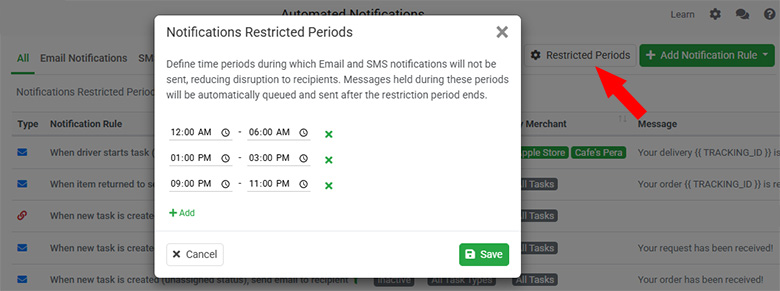
We’ve introduced a new Notifications Restricted Periods feature to give you greater control over when your automated customer notifications are delivered. Previously, all email and SMS notifications were sent immediately once a delivery event was triggered. With this update, you can now define specific time ranges, such as overnight hours, during which notifications will be paused. This ensures that your customers won’t receive messages at inconvenient times while maintaining smooth communication throughout the delivery process.
Any messages generated during these restricted periods will be automatically held in a queue and sent as soon as the restriction period ends. You can easily configure this by navigating to the Settings-Notifications page and clicking the Restricted Periods button at the top. From there, set your preferred restricted time windows, and the system will handle the rest, pausing, queuing, and resuming notifications automatically to deliver a more professional and considerate customer experience.
2. Mandatory Columns for Spreadsheet Upload
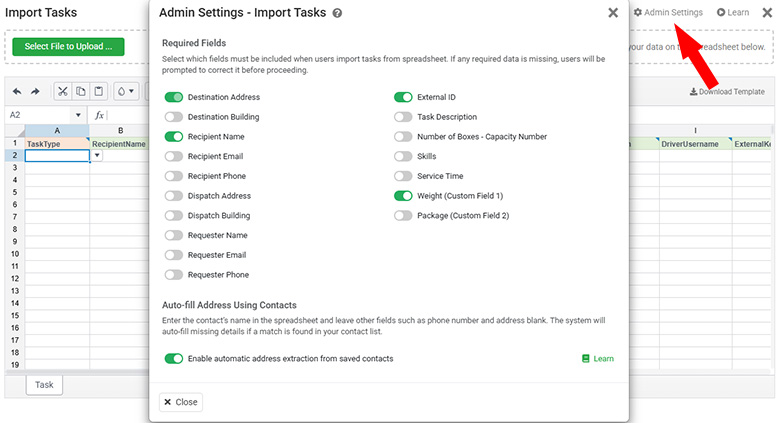
We’ve added a powerful new feature that allows administrators to define mandatory columns for spreadsheet uploads. Previously, dispatchers or merchants might upload new delivery tasks without key details such as customer name, contact number, or delivery instructions. Missing this essential information often caused delays, as couriers had to follow up with clients to fill in the gaps, adding unnecessary time and stress to the delivery process.
With this enhancement, administrators can now set specific required fields that must be included in every spreadsheet upload. When users attempt to import jobs, the system will automatically validate the uploaded file and alert them if any required fields are missing, along with clear instructions to correct the issue. This ensures that all job data is complete before reaching your dispatch team, reducing manual follow-ups and improving delivery efficiency.
3. Percentage-based Invoice Charge
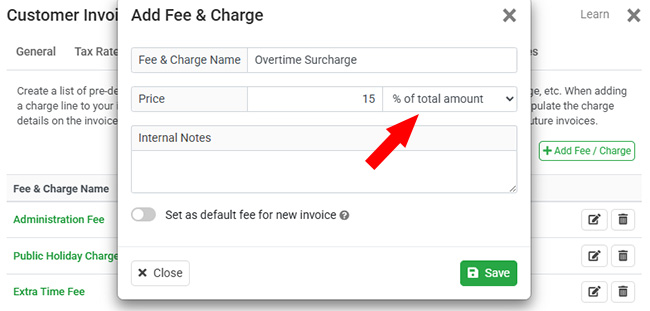
We’re introducing a new Percentage-Based Invoice Charge feature to give you more flexibility when applying additional fees to customer invoices. In the past, surcharge lines such as public holiday fees or overtime charges could only be applied as fixed amounts, requiring manual adjustments to match different order sizes.
With this update, you can now configure additional charge lines to be calculated as a percentage of the order total. This allows you to automatically apply dynamic fees that adjust in proportion to each customer’s invoice value. You can also set percentage-based charges as defaults, ensuring that public holiday surcharges, overtime fees, and other variable costs are applied accurately and automatically, saving time and improving billing precision.
4. Suppress Shipping Fee Display for Merchants
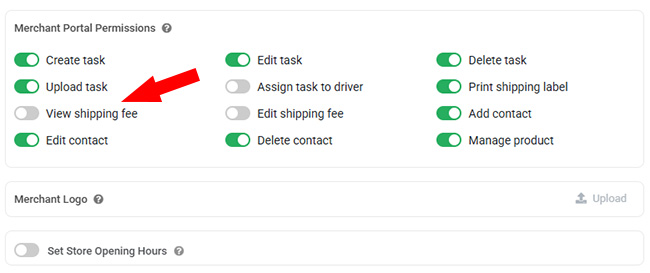
We’ve added a new option to suppress the display of shipping fees for merchants, giving administrators greater flexibility and control over how pricing information is shared. While our Pricing Template module automatically calculates shipping fees for each job, some businesses may prefer not to show these fees to merchants, especially when shipping costs are managed externally or included in other service arrangements.
With this update, administrators can now easily enable or disable shipping fee visibility directly from the merchant’s profile settings. To hide fees for a specific merchant, simply adjust the permissions in the Merchant Profile section. This feature helps prevent confusion for merchants who don’t want to see the automated fee calculation, ensuring a cleaner and more tailored user experience across your pricing and billing processes.
5. Driver Earnings Payout Instructions
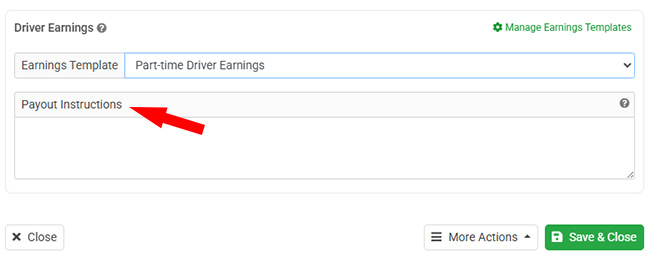
We’ve enhanced the Driver Earnings module with a new Payout Instructions field to make managing driver payments simpler and more organized. Previously, administrators had to manually track or request payout details each time driver earnings were processed. With this update, you can now store each driver’s bank account information or electronic payment links directly in their user profile.
When generating driver earnings reports, the system will automatically include the corresponding payout instructions for each team member. This makes it faster and easier for managers to process payments accurately, without the need to look up details from multiple sources. The new Payout Instructions field helps streamline driver compensation workflows and ensures a smoother, more efficient payout process.