
Welcome to the September 2025 release notes. Our delivery management platform is updated weekly to ensure continuous improvement and innovation. This month brings a range of enhancements designed to make the platform even more intuitive and efficient. We’re excited to share with you some new features released this month:
1. Revamped Task Pricing Module
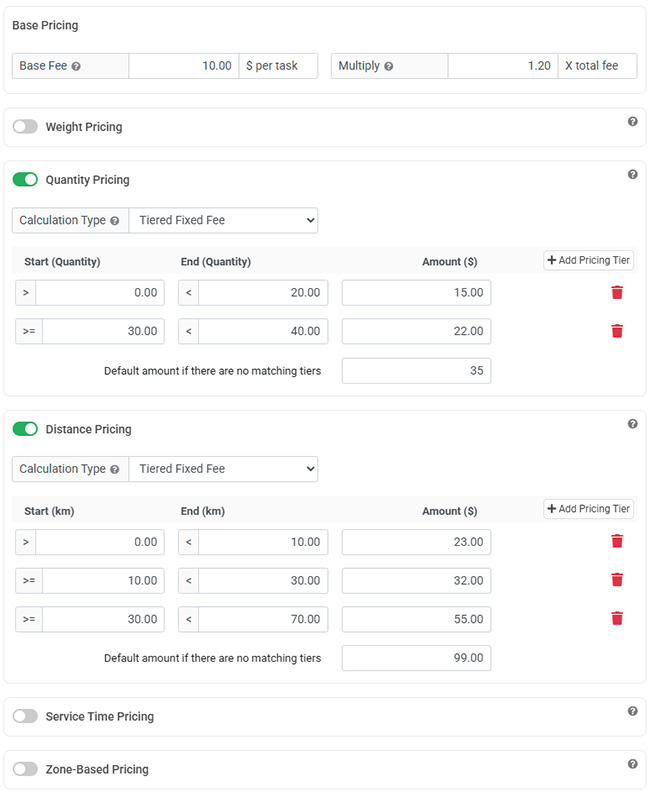
We’re excited to announce the revamped Task Pricing module, designed to give you greater flexibility and precision in calculating shipping fees automatically. This update makes it easier to create customized pricing rules that adapt to the unique requirements of each delivery scenario. One of the new features in this release is the introduction of multi-tiered pricing structures.
With the new Tiered Fixed Fee option, you can define flat charges across different usage ranges. For example, delivery jobs below 5 units at $10, between 5 and 30 units at $20, and over 30 units at $50. This allows you to set clear, predictable pricing while offering more control over how fees scale with usage. Whether you need simple flat rates, incremental overage pricing, zone-based pricing, or tier-based pricing strategies, the new Task Pricing Module delivers the flexibility you need to optimize your operations.
2. Single-Task Automated Invoice Generation
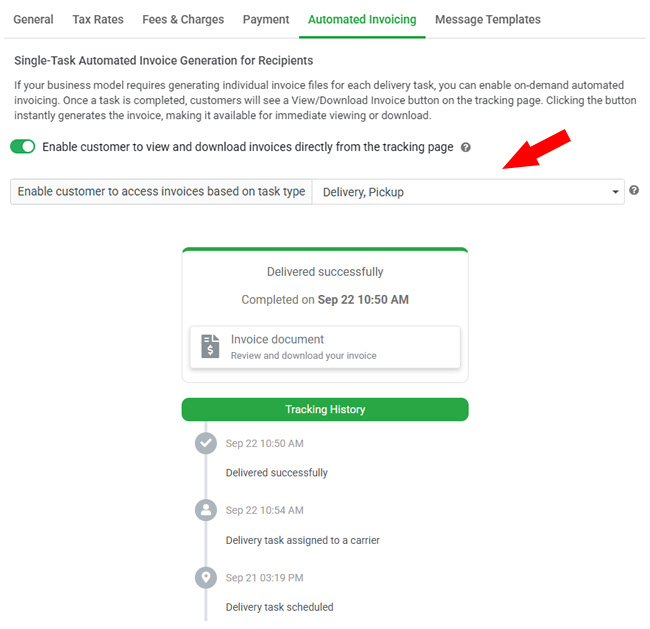
The Customer Invoicing module has been enhanced to provide even greater automation and flexibility for your customer billing process. Traditionally, invoices could be generated automatically on a scheduled basis for merchants, reducing the need for manual invoice creation. With this update, it now supports generating invoices automatically based on individual tasks for recipients, making it easier to meet business models that require a separate invoice for each delivery.
When enabled, the new on-demand automated invoicing feature allows recipients to instantly generate an invoice directly from the customer tracking page. Once a task is completed, customers will see a View/Download Invoice button, giving them immediate access without needing to contact your team. You can predefine invoice details such as payment terms, line notes, taxes, and additional fees in the invoice settings, ensuring consistency and accuracy. This improvement not only saves time for your team but also enhances the customer experience by making invoicing seamless and self-service.
3. Enhanced functionality within the Shopify app
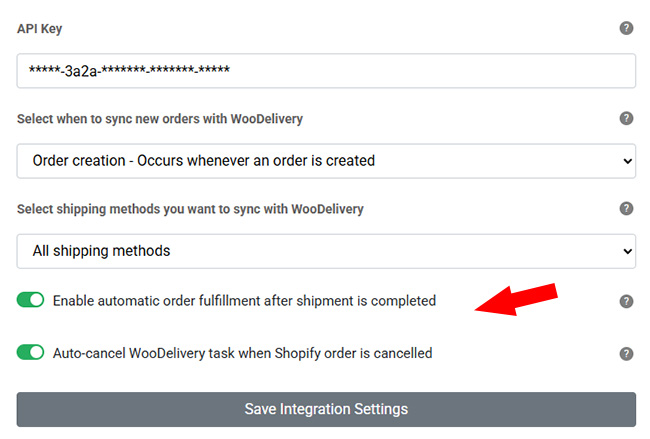
We have recently released the new WooDelivery Shopify App to Shopify App Store, makes integration between WooDelivery and Shopify seamless and efficient. With the latest update, we’ve expanded the app’s capabilities to help merchants better manage their orders and deliveries. Shopify orders can now be automatically marked as “Fulfilled” once the corresponding shipment is completed in WooDelivery, eliminating the need for manual updates and ensuring real-time synchronization between platforms.
In addition, merchants can enable the option to automatically cancel associated delivery tasks in WooDelivery whenever a Shopify order is cancelled, keeping both systems aligned. To further improve transparency, when a delivery task is completed, the proof of delivery tracking link is automatically sent back to Shopify. This allows merchants to easily access delivery details and status directly from Shopify, without switching platforms, streamlining operations and enhancing the overall customer experience.
Note: The automatic order fulfilment feature requires a new permission scope from the Shopify store. If a merchant does not see this option in the app, please advise them to uninstall and reinstall the WooDelivery app on their Shopify store to ensure the necessary permissions are granted.
4. Assigned Vehicle Details on Tracking Page
Our Vehicle Management system offers robust tools for managing vehicles and assignments. It now includes a feature that displays the correct vehicle details assigned to each driver on the customer tracking page, ensuring customers always see accurate, dispatcher-approved information in real time.
When enabled, the tracking page will show the assigned vehicle’s description and license plate number, giving recipients better visibility and confidence in their delivery. If no vehicle is assigned through the Vehicle Management module, the system will automatically default to displaying the vehicle information from the driver’s profile. This enhancement ensures consistency, improves transparency, and provides a more professional experience for both dispatchers and customers.
